Stop juggling spreadsheets.
Run your repair shop from one place.
Tickets, invoicing, inventory, trade-ins, customer tracking, team management, and online booking — all in one platform built specifically for phone, electronics, and computer repair shops.
Card required — cancel any time before day 14 and you won't be charged.
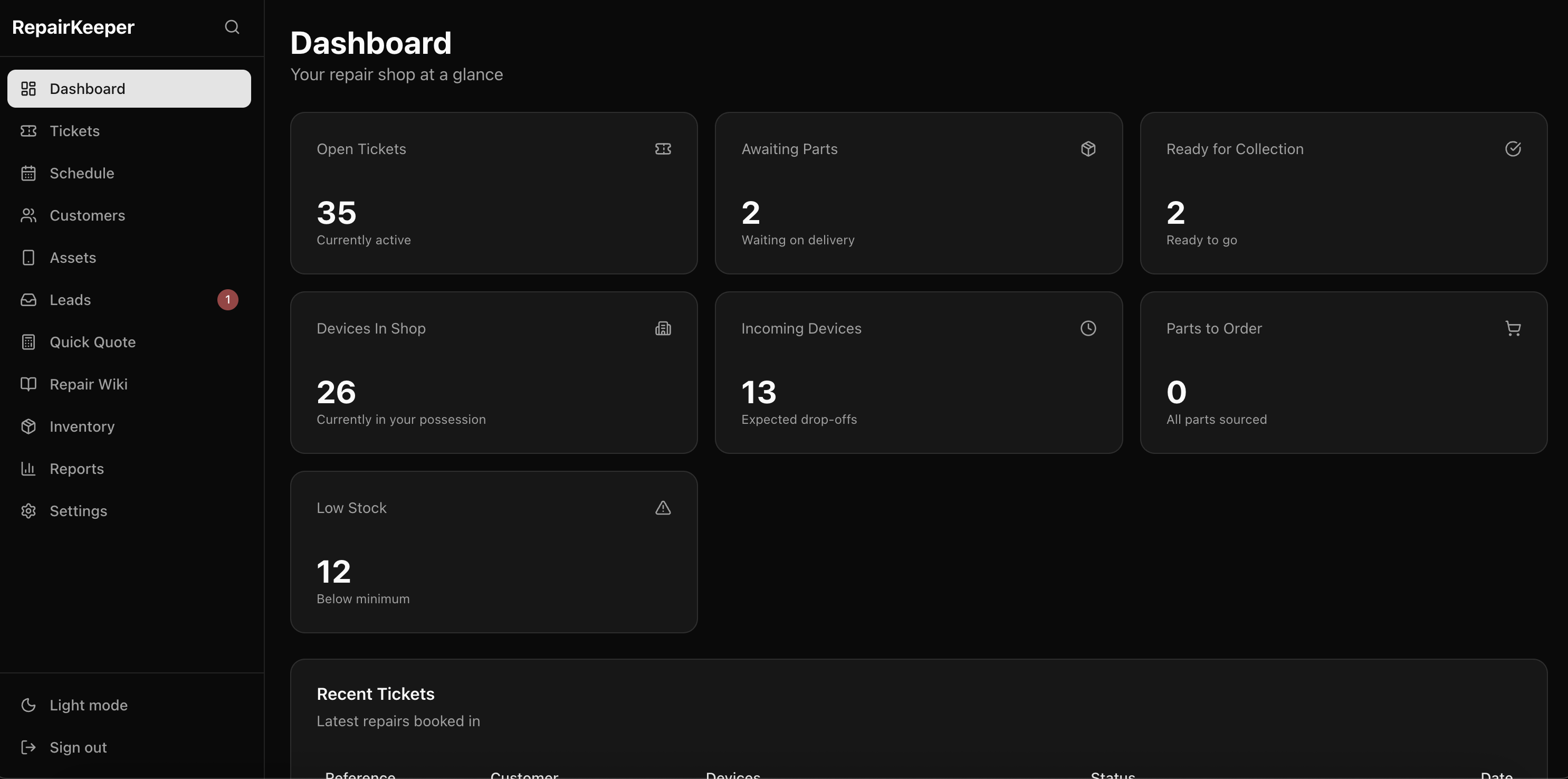
Up and running in minutes
Sign up in seconds
Pick a plan and start a 14-day free trial — card required, cancel any time before day 14. Your shop is ready instantly.
Set up your shop
Add your branding, invite your team, and configure statuses to match your workflow.
Start managing repairs
Create your first ticket, track devices, and give your customers real-time updates.
Everything your repair shop needs
One platform to manage your entire repair workflow — from intake to collection, quoting to payment, trade-ins to resale. Built for phone, electronics, and computer repair shops.
Ticket Management
Multi-device tickets with digital signatures, intelligent auto-status, diagnosis workflows, and subcontractor tracking — all in one view.
Learn moreQuoting & Invoicing
Professional quotes with customer accept/decline, invoices with partial payments, PDF export, deposit requests, and Stripe online payments.
Learn moreCustomer Management
Full customer profiles with smart duplicate detection, one-click merge, GDPR anonymisation, and per-customer notification preferences.
Learn moreInventory & Stock
Track stock across multiple locations with automatic allocation, low stock alerts, supplier management, and full audit trail on every movement.
Learn moreTrade-in & Refurbishment
Buy, grade, refurbish, and resell devices. Condition checklists, margin scheme support, and full lifecycle tracking from purchase to sale.
Learn moreRepair Wiki
Build a searchable knowledge base of devices, parts, faults, and repair guides — shared across all shops or kept private to yours.
Learn moreOnline Booking
Let customers book repairs directly from your website. Service selection, availability management, and deposit collection — all automated.
Learn moreReporting & Analytics
Revenue reports, repair summaries, customer insights, and inventory analysis. Understand your business at a glance with exportable data.
Team & Permissions
Three roles, 11 granular permission flags, email invitations, and a full audit log with before/after diffs on every action.
Learn moreMulti-device tickets with intelligent auto-status
One ticket can hold multiple devices — each tracked independently with its own status, parts, diagnosis, and timeline. The system handles status updates so your team can focus on repairs.
-
Multi-device support
A customer drops off a phone and a tablet? One ticket, two devices, each tracked separately with independent statuses and costs.
-
Auto-status engine
Statuses advance automatically based on parts workflow. Mark a part as ordered — the device moves to 'Awaiting Parts'. Ticket status always reflects the most behind device.
-
Diagnosis & approval workflow
Run diagnostics per device, share findings with customers, and let them approve or decline repairs from their tracking page before work begins.
-
Subcontractor & warranty tracking
Send devices out to subcontractors with courier and tracking details. Track warranty returns with customer reports and action taken notes.
-
Device photos & digital signatures
Photograph device condition at intake. Capture digital signatures for drop-off and collection. Record passcodes, accessories, and condition notes.
-
9 built-in statuses — fully customisable
From 'Awaiting Drop Off' through to 'Collected'. Create your own statuses with custom names, colours, ordering, and overdue alerts.
Professional quotes and invoices in minutes
From quick estimates to formal quotes with customer approval, detailed invoices with partial payments, and Stripe checkout — every step of the money side, handled.
-
Formal quotes with customer approval
Send professional quotes via email. Customers accept or decline from a unique link — with revision support and one-click convert to invoice.
-
Detailed invoices with PDF export
Line items, discounts, VAT, custom messages and footers. Finalise to lock changes, then send by email with built-in reminders.
-
Deposits & partial payments
Collect deposits before work begins via Stripe. Track partial payments across multiple methods — cash, card, bank transfer, or online.
-
Flexible VAT & pricing
Configurable VAT rates for quotes and invoices. Set default labour rates, postage, and payment fees — override per document when needed.
Deposit paid
£30.00
Remaining
£83.39
A seamless experience for your customers
Give your customers real-time visibility into their repairs. They can track progress, approve diagnoses, accept quotes, pay invoices, and book appointments — all without calling you.
-
Live tracking page
Every ticket generates a unique link. Customers see real-time status, device photos, estimated costs, public notes, and timeline updates.
-
Diagnosis approval
Share diagnosis findings with customers. They review costs and approve or decline repairs directly from their tracking page — no phone call needed.
-
Online payments & deposits
Customers pay invoices or deposits directly from their tracking page via Stripe. Payment status updates automatically — no manual reconciliation.
-
Online repair booking
Embed a booking page on your website. Customers choose a service, pick a date, and pay a deposit — enquiries land as leads in your dashboard.
-
Smart email notifications
Automated emails on ticket creation, status changes, and diagnosis ready — with intelligent debouncing so customers aren't spammed by rapid updates.
-
Public enquiry form
Embed a branded form on your website with built-in spam protection. Enquiries land as leads with one-click conversion to tickets.
Repair Status
Device
iPhone 15 Pro
Fault
Screen Replacement
Diagnosis Ready — Approval Required
Screen and digitiser need replacing. Estimated cost: £89.99
Quote #QT-0015
£89.99
Stock management that works for you
Track inventory across multiple locations. When you add a part to a ticket, stock is checked and allocated instantly.
-
Multi-location tracking
Manage stock across your main shop, warehouse, or second branch — all from one view.
-
Automatic allocation
Add a part to a ticket and stock is decremented instantly. When stock arrives, allocate to waiting tickets with one click.
-
Low stock alerts
Set minimum stock levels per part per location. Get warned before you run out.
-
Stock demand view
See all parts needed across all open tickets at a glance, with supplier links for easy reordering.
iPhone 15 Pro Screen
Main Shop
Samsung S24 Battery
Warehouse
MacBook Air Keyboard
Main Shop
3 parts awaiting allocation across 5 tickets
Buy, refurbish, and resell devices
Track traded-in and purchased devices through the full refurbishment lifecycle. From intake grading to sale — with checklists, cost tracking, and margin scheme support.
-
Device intake & grading
Record purchases from customers or suppliers. Grade condition from Excellent to Poor, capture IMEI, serial, colour, and storage details.
-
Refurbishment checklists
Create checklist templates per device type. Track pass/fail results for every check — battery health, screen quality, buttons, speakers, and more.
-
Full lifecycle tracking
Follow each device from Purchased → Refurbishing → Ready for Sale → Sold. Link to refurbishment tickets for parts and labour tracking.
-
Cost & margin tracking
Track purchase price, refurbishment costs, listed price, and sold price. Margin scheme support for VAT-registered businesses.
iPhone 14 Pro Max
Ready for SaleSamsung Galaxy S23
RefurbishingiPad Air (5th Gen)
PurchasedThis month
8 sold
Avg margin
£127
Shared repair knowledge at your fingertips
Build a searchable knowledge base of devices, parts, faults, and repair guides. Contribute to a global database — or keep entries private to your shop.
-
Devices, parts, faults & guides
Link relationships: which parts fit which devices, which faults affect which devices, which guides solve which faults.
-
Global sharing
Contribute your repair knowledge to a shared database visible to all RepairKeeper shops — or keep entries private.
-
Attach resources
Link to videos, supplier pages, guides, forums, and documentation directly from wiki entries.
-
Searchable & linked
Quickly find the right guide for any device and fault combination. Import devices in bulk via CSV.
iPhone 15 Pro
Global12 parts · 8 faults · 5 guides
Samsung Galaxy S24
Global9 parts · 6 faults · 4 guides
MacBook Air M2
Private7 parts · 4 faults · 3 guides
Built for teams from day one
Three roles, 11 permission flags, invite system, and a full audit trail. Control exactly who can do what.
-
Roles & permissions
Owner, Admin, and Technician roles with 11 granular permission flags — customisable per team member.
-
Email invitations
Invite new team members via email with their role pre-assigned. They're ready to go the moment they accept.
-
Full audit trail
Every create, update, and delete is recorded with before/after diffs, user attribution, and timestamps.
-
Secure by default
Passkey/biometric login, encrypted passwords, multi-tenancy isolation, and JWT sessions with 7-day expiry.
Alex (You)
Full access
Sam
9 of 11 permissions
Jordan
4 of 11 permissions
Recent Audit Log
Sam updated ticket RK-0042 status → Ready for Collection
Jordan added part to RK-0044 → Keyboard Assembly
Alex finalised invoice INV-0018 → £89.99
Connect your tools, agents, and automations
RepairKeeper has a full REST API with org-scoped keys. Connect AI agents, Zapier, Make, or your own software — and automate the repetitive parts of running a repair shop.
-
Full REST API
Every core function — tickets, customers, devices, invoices, stock, statuses — is accessible via a clean REST API. Build on top of RepairKeeper or connect any tool that speaks HTTP.
-
AI agent integration
Connect Claude, GPT, or any agent platform. Agents can open tickets from emails, chase invoices, update statuses, reorder stock, and send customer updates — without you touching anything.
-
Org-scoped API keys
Generate API keys in Settings with custom scopes. Keys use a rk_live_ prefix, are hashed and never stored in plain text, and support per-key IP allowlists.
-
Outbound webhooks
Push real-time events to external systems the moment something changes — ticket created, device status updated, invoice paid, quote accepted. Payloads are HMAC-signed and retried on failure.
-
Zapier & Make compatible
Any platform that can hit an HTTP endpoint works with RepairKeeper. Build automations in Zapier, Make, n8n, or your own tooling without writing a line of code.
-
Secure by default
All API traffic is over HTTPS. Keys are scoped to your organisation, hashed at rest, and can be revoked instantly. You stay in control of what connects and what it can do.
Tickets · Customers · Invoices · Stock
rk_live_•••••••••••••••• ACTIVE Simple, transparent pricing
Every plan starts with a 14-day free trial. Cancel any time before day 14 and you won't be charged.
Solo
Paid-tier essentials for solo repairers
- Core ticketing (multi-device)
- Customer tracking page
- Public repair enquiry form
- Parts inventory & stock management
- Wiki / internal knowledge base
- Asset tracking (QR codes)
- Label printing
- CSV export
- Custom ticket number prefix
- Custom SMTP & email templates
- Online card payments (Stripe Connect)
- Trade-in & refurbishment system
- Product catalogue
- Online repair booking
- Team roles & permissions (RBAC)
- Audit log / activity history
- Reporting & analytics
- Device photos on tickets
- Branding removal
- Webhooks & integrations
- Note file attachments
- Multiple locations / branches
Lite
More capacity for solo repairers
- Core ticketing (multi-device)
- Customer tracking page
- Public repair enquiry form
- Parts inventory & stock management
- Wiki / internal knowledge base
- Asset tracking (QR codes)
- Label printing
- CSV export
- Custom ticket number prefix
- Custom SMTP & email templates
- Online card payments (Stripe Connect)
- Trade-in & refurbishment system
- Product catalogue
- Online repair booking
- Team roles & permissions (RBAC)
- Audit log / activity history
- Reporting & analytics
- Device photos on tickets
- Branding removal
- Webhooks & integrations
- Note file attachments
- Multiple locations / branches
Standard
For growing repair shops
- Core ticketing (multi-device)
- Customer tracking page
- Public repair enquiry form
- Parts inventory & stock management
- Wiki / internal knowledge base
- Asset tracking (QR codes)
- Label printing
- CSV export
- Custom ticket number prefix
- Custom SMTP & email templates
- Online card payments (Stripe Connect)
- Trade-in & refurbishment system
- Product catalogue
- Online repair booking
- Team roles & permissions (RBAC)
- Audit log / activity history
- Reporting & analytics
- Device photos on tickets
- Branding removal
- Webhooks & integrations
- Note file attachments
- Multiple locations / branches
Pro
Full power for busy shops
- Core ticketing (multi-device)
- Customer tracking page
- Public repair enquiry form
- Parts inventory & stock management
- Wiki / internal knowledge base
- Asset tracking (QR codes)
- Label printing
- CSV export
- Custom ticket number prefix
- Custom SMTP & email templates
- Online card payments (Stripe Connect)
- Trade-in & refurbishment system
- Product catalogue
- Online repair booking
- Team roles & permissions (RBAC)
- Audit log / activity history
- Reporting & analytics
- Device photos on tickets
- Branding removal
- Webhooks & integrations
- Note file attachments
- Multiple locations / branches
Card required at signup — we don't charge until day 14, and you can cancel any time before then.
Enterprise
For multi-location repair chains or businesses with custom requirements.
What makes RepairKeeper different
Built from the ground up for repair shops — not retrofitted from generic helpdesk software.
Multi-device tickets
One ticket, multiple devices — each with independent statuses, parts, diagnosis, and costs. Most competitors treat a ticket as one device.
Agent-ready API
Connect AI agents, automation tools, or your own software directly to RepairKeeper. Full REST API with secure org-scoped keys — your shop, running on autopilot.
Intelligent auto-status
Statuses advance automatically based on your parts workflow. Zero manual updates needed — the system always reflects reality.
Trade-in & refurbishment
A complete buy-grade-refurbish-sell pipeline built in. Condition checklists, cost tracking, and margin scheme support.
Global repair wiki
A shared knowledge base across all shops on the platform. Devices, parts, faults, and guides — contributed by the community.
Diagnosis approval
Share diagnoses with customers and let them approve or decline repairs from their tracking page — before any work begins.
Online repair booking
Customers book repairs on your website with service selection, date picking, and deposit payment — no phone calls required.
Passkey authentication
Log in with fingerprint, Face ID, or security key — no password needed. Modern security with zero friction.
Customer self-service
Customers track repairs, approve diagnoses, accept quotes, and pay invoices from a single link. No app downloads needed.
Full audit trail
Every change logged with before/after diffs, user attribution, and timestamps. Complete accountability for compliance.
Smart duplicate detection
Automatically identifies duplicate customers using name and phone matching, with one-click field-by-field merge and GDPR anonymisation.
Granular permissions
11 permission flags per team member — not just 'admin or not'. Control exactly who can create invoices, delete tickets, or manage stock.
Spam-protected forms
Embed branded enquiry and booking forms on your website with built-in honeypot and time-trap spam protection.
Frequently asked questions
Got questions? We've got answers.
What types of repair shops is RepairKeeper for?
RepairKeeper is built for any independent repair business — phone repair shops, electronics repair centres, computer service providers, and similar trades. Whether you're a solo technician or a team of 20, RepairKeeper scales to fit your workflow.
Is there a free plan?
We no longer offer a permanent free plan to new signups. Instead, every paid plan — starting from £12/mo with Solo — comes with a 14-day free trial. You'll need to enter a card at signup, but we don't charge anything until the trial ends, and you can cancel any time before then with no charge. If you were a RepairKeeper user before April 2026, your free plan is grandfathered and still works as it always has.
How long is the free trial?
14 days on whichever plan you choose. You get full access to that plan's feature set from day one, and we send a reminder email 3 days before the trial ends so nothing surprises you.
Do I need a credit card to start the trial?
Yes — Stripe holds the card on file and only charges on day 14 if you haven't cancelled. We've found that requiring a card leads to far better onboarding (fewer abandoned accounts, more engaged trials), but you're never locked in: cancel any time during the trial and you won't be charged a penny.
What happens if I cancel during the trial?
No charge at all. Your subscription ends immediately, your account loses access to the app when the trial period ends, and your data is retained for 30 days in case you decide to come back. After 30 days, the data is permanently deleted unless you reactivate.
What makes RepairKeeper different from other repair shop software?
RepairKeeper is the only platform with true multi-device tickets (one ticket, multiple devices, each tracked independently), an intelligent auto-status engine, a built-in trade-in and refurbishment pipeline, customer diagnosis approval, online repair booking, and a shared global repair wiki. Plus passkey authentication, GDPR-compliant customer management, and a full audit trail with before/after diffs.
Can my customers track their repairs?
Absolutely. Every ticket generates a unique tracking link. Customers can see real-time repair progress, view device photos, approve or decline diagnoses, accept quotes, and pay invoices or deposits online via Stripe — all without creating an account.
How does the auto-status system work?
RepairKeeper automatically advances device statuses based on your parts workflow. When you mark a part as 'ordered', the device moves to 'Awaiting Parts'. When parts arrive and are allocated, it moves forward again. The ticket status always reflects the most behind device — zero manual updates needed. You can also create custom statuses with your own names, colours, and overdue alerts.
Can I buy and resell refurbished devices?
Yes. RepairKeeper includes a full trade-in and refurbishment system. Record purchases from customers or suppliers, grade device condition, run refurbishment checklists, track costs, and manage the lifecycle from purchase to sale. Margin scheme support is included for VAT-registered businesses.
How does quoting and invoicing work?
You can create quick estimates or formal quotes with line items that customers accept or decline from a unique link. Quotes convert to invoices with one click. Invoices support discounts, VAT, partial payments, deposits, PDF export, email sending with reminders, and online payment via Stripe. Draft invoices can be edited; finalised invoices are locked to prevent accidental changes.
Can customers book repairs online?
Yes. You can set up an online booking page where customers select a service, pick an available date, and pay a deposit. You control availability per day of the week, set blackout dates, and cap maximum bookings per day. Bookings land as leads in your dashboard for easy conversion to tickets.
Can I manage multiple team members?
Yes, on the Standard plan (up to 5 team members) and Pro plan (up to 15). RepairKeeper supports three roles (Owner, Admin, Technician) with 11 granular permission flags that you can customise per team member. Invite new members via email, and every action is recorded in a full audit log with before/after diffs.
Is my data secure?
Security is built into every layer. RepairKeeper uses encrypted passwords, supports passkey/biometric login (WebAuthn), enforces strict multi-tenancy isolation so no data leaks between shops, and logs every change in a tamper-evident audit trail. Customer data can be anonymised for GDPR compliance.
Do I need to install anything?
No. RepairKeeper is a web-based SaaS application that works in any modern browser on desktop, tablet, or phone. There's nothing to install, update, or maintain — just log in and go.
Can I send devices out to subcontractors?
Yes. Mark any device as sent to a subcontractor with courier name, tracking number, and return tracking. When the device comes back, record the action taken and return it to your normal repair workflow.
What reporting is available?
RepairKeeper includes reports for repair summaries, revenue tracking, customer insights, and inventory analysis. Export your data as CSV for use in spreadsheets or accounting software. The dashboard gives you a real-time overview of key metrics, upcoming deadlines, and unactioned leads.
Can I integrate RepairKeeper with other tools?
RepairKeeper supports configurable webhooks that fire on key events like ticket creation, lead submission, and invoice creation. You can also sync your calendar via iCal, export data as CSV, and configure custom SMTP for email sending.
How do I get started?
Click 'Start 14-day free trial', pick the plan that fits your shop, and create your account in under a minute. You'll have full access to your chosen plan immediately, and Stripe won't charge your card until day 14.
Ready to ditch the spreadsheets?
Join repair shops across the UK already using RepairKeeper to manage tickets, track inventory, serve customers, and grow their business. Every plan starts with a 14-day free trial.
Card required — cancel any time before day 14 and you won't be charged.